Official fuel prices from the UK Government Fuel Finder service and EV charging data from Open Charge Map - all in one beautiful, free app.
⛽
Gov UK Data
Fuel Finder Service
⚡
EV Charging
Open Charge Map
🗺️
Interactive Map
Colour-coded prices
🗣️
Siri & Shortcuts
Hands-free queries
🔒
Privacy First
No ads, no tracking
How It Works
FuelSaver UK shows you the cheapest petrol, diesel, and EV charging stations nearby. Prices are fetched from the UK Government's Fuel Finder service - updated twice a day.
Map & Station List
Colour-coded price tags on the map. Scrollable list with prices and distances below.
Fuel Type Filter
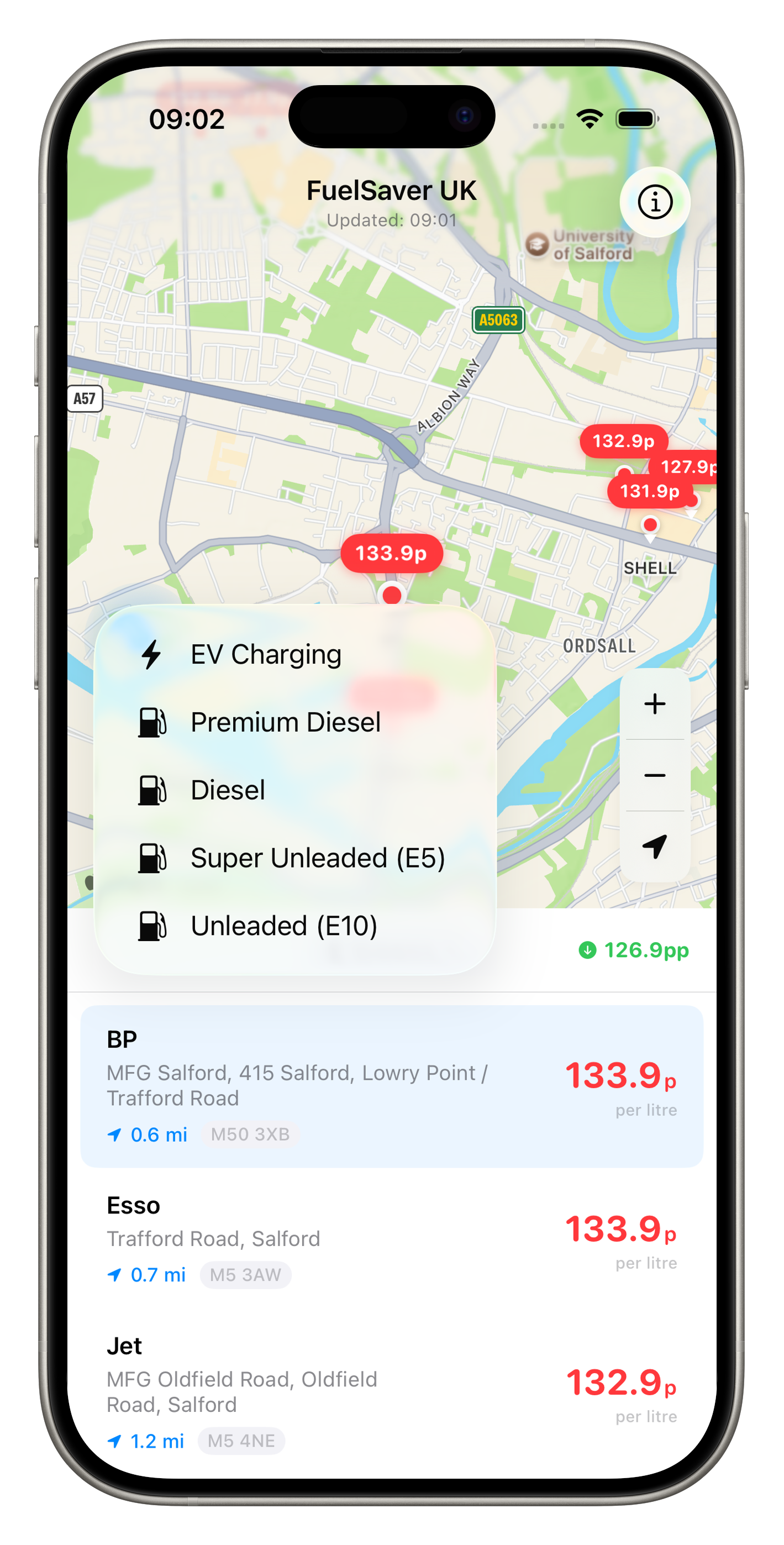
Switch between Unleaded, Super Unleaded, Diesel, Premium Diesel, or EV Charging.
Getting Started
Get up and running in under a minute.
Allow Location Access
FuelSaver UK needs your location to find stations nearby and calculate distances. Tap "Allow While Using App" when prompted. Your location is used only on-device and is never sent to our servers.
Wait for Prices to Load
The app fetches the latest fuel prices from the UK Government's Fuel Finder service. A progress indicator shows the download status. This usually takes a few seconds.
Browse the Map
The top half of the screen shows an interactive map with your location and the 10 nearest stations. Each station has a colour-coded price tag - green for the cheapest, red for the most expensive.
Browse the List
The bottom half shows a scrollable list of the same stations with brand name, address, postcode, distance, and price per litre. Tap any station to highlight it on the map.
Pull to Refresh
Drag the list downward to refresh all data and re-centre the map on your current location - just like on app launch.
Filtering by Fuel Type
Find exactly the fuel you need with a single tap.
The fuel type filter is located in the list header - it's the coloured capsule button on the left (e.g. "Unleaded"). Tap it to open a dropdown menu with five options:
Fuel Type
Description
Unleaded (E10)
Standard petrol, 95 octane - the most common fuel in the UK
Premium diesel variants (e.g. Shell V-Power Diesel, bp Ultimate Diesel)
EV Charging
Electric vehicle charging points from Open Charge Map
Your selected fuel type is remembered between sessions - you don't need to reselect it each time you open the app.
Fuel Type Filter Menu
Tap the coloured capsule to switch fuel type. Both the map and list update instantly.
Sorting Stations
Arrange the list in the order that matters to you.
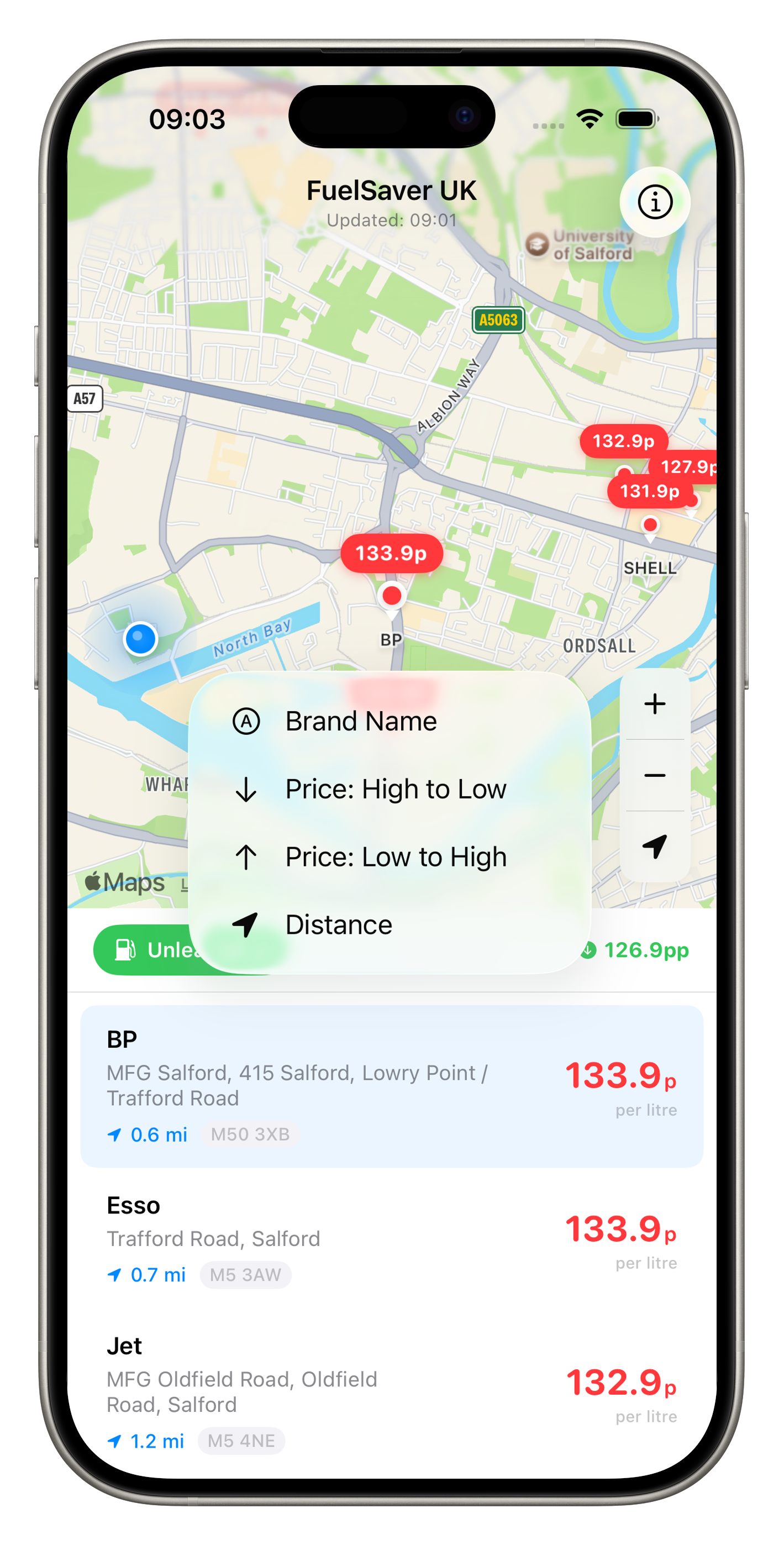
Next to the fuel type filter, you'll see a sort button (e.g. "Distance"). Tap it to choose from four sort options:
Sort Option
What It Does
Distance
Nearest stations first - great for finding fuel quickly
Price: Low to High
Cheapest stations first - best for saving money
Price: High to Low
Most expensive stations first
Brand Name
Alphabetical by brand (Asda, bp, Esso, etc.)
Your sort preference is also remembered between sessions.
Sort Options Menu
Four ways to arrange your station list. Your choice is saved automatically.
Map Controls
Navigate the map with intuitive controls.
➕
Zoom In
Tap the + button on the map to zoom in for a closer view of nearby stations.
➖
Zoom Out
Tap the − button to zoom out and see a wider area with more stations.
📍
Re-centre
Tap the location arrow button to snap the map back to your current location at the default zoom level.
💚
Best Price Tap
In the list header, tap the green price indicator to instantly pan the map to the cheapest station nearby.
Getting Directions
Long-press any station on the map or in the list to get driving directions instantly.
FuelSaver UK supports Apple Maps, Google Maps, and Waze. Long-press (press and hold) any fuel or EV station - on the map pin or in the station list - to open a context menu with:
🧭
Directions
Opens your preferred navigation app with driving directions to the station. If you have multiple navigation apps installed, a submenu lets you choose between Apple Maps, Google Maps, and Waze.
📋
Copy Address
Copies the station's full address and postcode to your clipboard so you can paste it into any other app.
Long-Press Context Menu
Press and hold any station on the map or in the list to see navigation options.
Apple Maps Directions
Driving directions open directly in Apple Maps with the station name and location.
Note: Google Maps and Waze options appear only when the respective app is installed on your device. If only Apple Maps is available, tapping "Directions" opens it directly without a submenu.
Understanding Price Colours
At a glance, know which stations are cheapest.
Every station annotation on the map displays a price tag. The colour tells you how that price compares to others nearby:
Colour
Fuel Stations
EV Chargers
Green
Cheapest third of prices
Ultra-rapid (150kW+)
Orange
Mid-range prices
Fast (22–49kW)
Red
Most expensive third
Slow (<22kW)
Purple
-
Rapid (50–149kW)
EV Charging Stations
Find the fastest chargers near you with detailed connector info.
Select "EV Charging" from the fuel type filter to switch to EV mode. The map and list update to show charging stations from Open Charge Map instead of fuel stations.
Each EV station shows:
🔌
Operator & Location
The charging network name (e.g. Tesla, Pod Point, BP Pulse) and the street address.
⚡
Power (kW)
Maximum charging power available. Higher kW means faster charging for your vehicle.
🔗
Connector Types
Which plugs are available - CCS, CHAdeMO, Type 2, etc. Check your car's connector before driving there.
💷
Usage Cost
Where available, the per-kWh or session cost is displayed. Not all operators publish pricing data.
The purple bolt icon in the list header shows the fastest charger nearby - tap it to pan the map to that station.
Siri & Shortcuts
Ask for fuel prices hands-free while driving.
FuelSaver UK supports Siri voice commands and the Shortcuts app. No setup required - just ask Siri:
🗣️
"Hey Siri, find cheap petrol with FuelSaver UK"
Finds the cheapest unleaded station nearby
🗣️
"Hey Siri, find cheapest diesel near me in FuelSaver UK"
Finds the cheapest diesel station nearby
🗣️
"Hey Siri, get fuel prices from FuelSaver UK"
Finds the cheapest fuel at your default fuel type
🗣️
"Hey Siri, open FuelSaver UK"
Opens the app directly
Siri responds with the cheapest price, station name, and distance. For example:
"The cheapest Unleaded nearby is 132.9p at Jet, 1.2 miles away."
Pre-configured shortcuts also appear automatically in the Shortcuts app. You can create custom automations like "When I get in my car, find cheap petrol."
About & Tip Jar
Learn about the app and support its development.
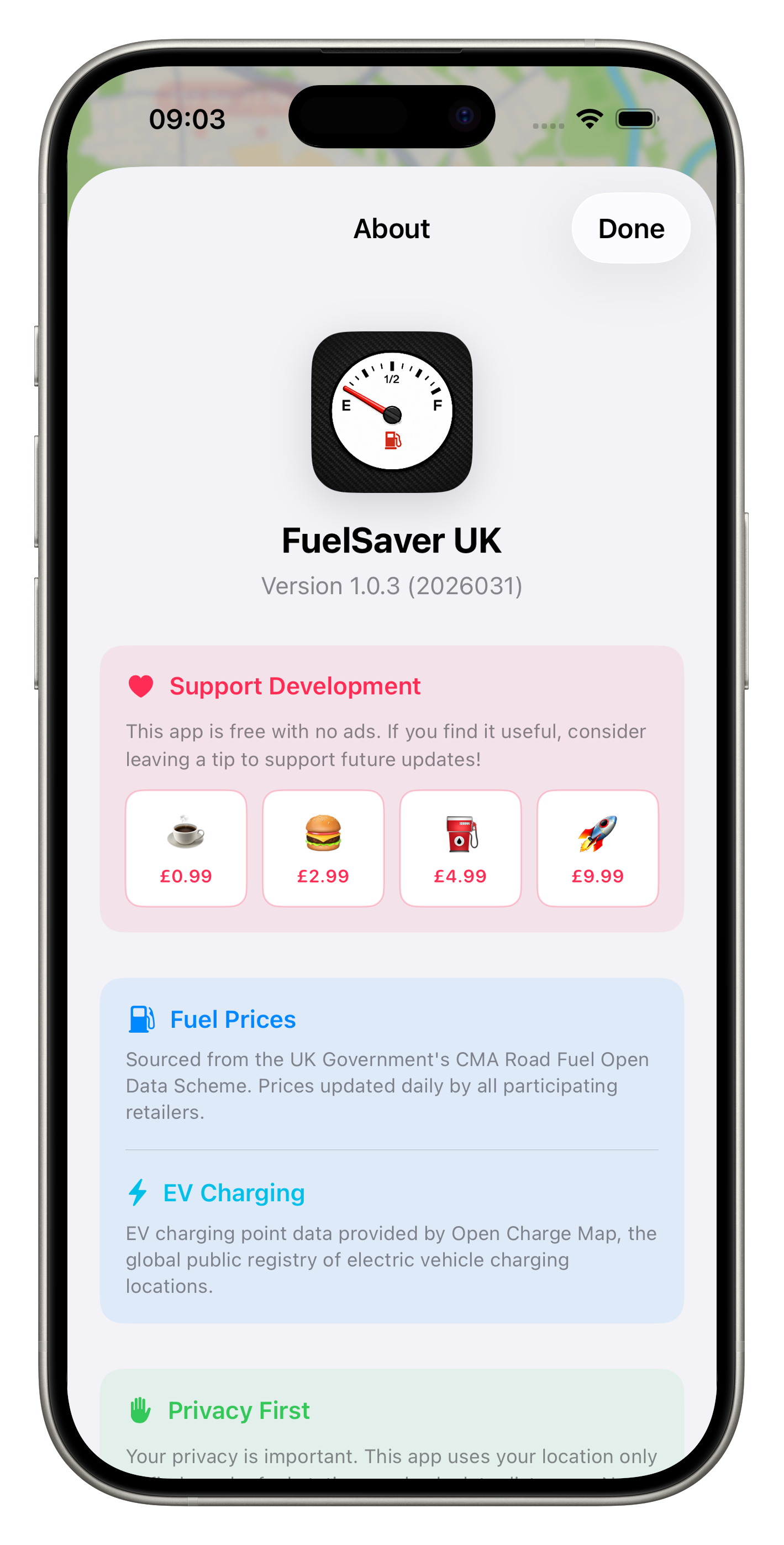
Tap the info button (ⓘ) in the top-right corner of the navigation bar to open the About screen. Here you'll find:
💝
Tip Jar
FuelSaver UK is free with no ads. If you find it useful, you can leave an optional tip to support development. Four tiers: Coffee (£0.99), Meal (£2.99), Full Tank (£4.99), and Super (£9.99).
📊
Data Sources
Details about where the fuel prices and EV charging data come from, including the UK Government Fuel Finder service and Open Charge Map.
🔒
Privacy Information
A summary of the app's privacy practices - no data collection, no tracking, location used only on-device.
About & Tip Jar
Support development with an optional tip. All features are free - no ads, ever.
Data Sources
Official UK Government fuel price data plus Open Charge Map for EV charging.
Fuel prices come from the UK Government Fuel Finder service, operated by the Department for Energy Security and Net Zero (DESNZ). The data is updated twice a day and covers thousands of fuel stations across the UK. FuelSaver UK downloads the latest data each time you open the app or pull to refresh.
✓ UK Gov Fuel Finder (Fuel Prices)
✓ Open Charge Map (EV Charging)
The Fuel Finder service aggregates prices from fuel retailers across the UK, providing a single, centralised data source that is more comprehensive and reliable than individual retailer feeds.
Landscape & iPad Support
The app adapts beautifully to any screen size and orientation.
📱
Portrait Mode
Map on the top half, station list on the bottom half. The classic mobile layout for one-handed use.
📺
Landscape Mode
Map on the left, station list on the right - a side-by-side split view that takes advantage of the wider screen.
🌙
Dark Mode
Full dark mode support that follows your system setting. The map switches to a dark style automatically.
🔤
Dynamic Type
All text scales with your system font size setting. The layout adapts gracefully to larger text sizes.
Requirements
What you need to run FuelSaver UK.
Requirement
Detail
Platform
iPhone or iPad
iOS Version
iOS 18.0 or later
Price
Free (optional Tip Jar)
Internet
Required to fetch fuel prices and EV charging data
Location
"When In Use" permission required for nearby station search
Age Rating
4+ (no objectionable content)
Contact & Support
If you have questions, feedback, or feature requests, you can reach the developer on X: